> ## Documentation Index
> Fetch the complete documentation index at: https://docs.mesion.ai/llms.txt
> Use this file to discover all available pages before exploring further.

> 크레딧 충전 방법과 카드 등록을 안내해요.

# 크레딧 충전

## 충전하기

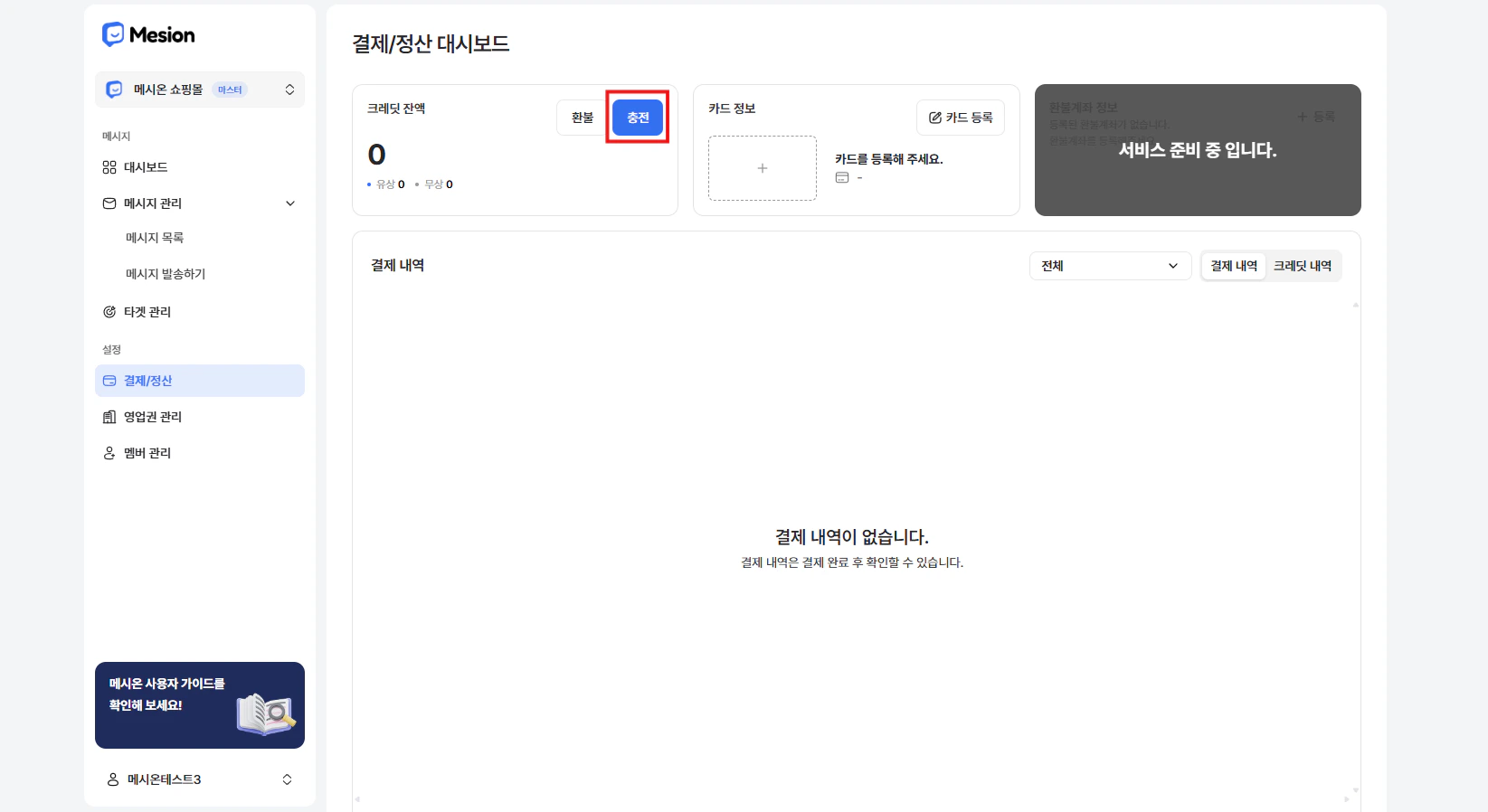
좌측 메뉴 **결제/정산 페이지**에서 크레딧을 충전할 수 있어요.
<Frame>
  <img src="https://mintcdn.com/uneedcomms-b787417f/a3jWm3LZ4he9dPe5/images/image-42.png?fit=max&auto=format&n=a3jWm3LZ4he9dPe5&q=85&s=642db6929eaf5776371d005a7622a948" alt="Image" width="1645" height="898" data-path="images/image-42.png" />
</Frame>

<Frame>
  <img src="https://mintcdn.com/uneedcomms-b787417f/RQgN1Vu4OCOongI1/images/image-41.png?fit=max&auto=format&n=RQgN1Vu4OCOongI1&q=85&s=3dbb5ecf37568a405b7467ab7aa224d4" alt="Image" width="2962" height="1282" data-path="images/image-41.png" />
</Frame>

<Frame>
  <img src="https://mintcdn.com/uneedcomms-b787417f/CuDuGdZpwDsxjNud/images/image-52.png?fit=max&auto=format&n=CuDuGdZpwDsxjNud&q=85&s=8cc29c150d67fcaf101830b5456c2e7b" alt="Image" width="3232" height="1206" data-path="images/image-52.png" />
</Frame>

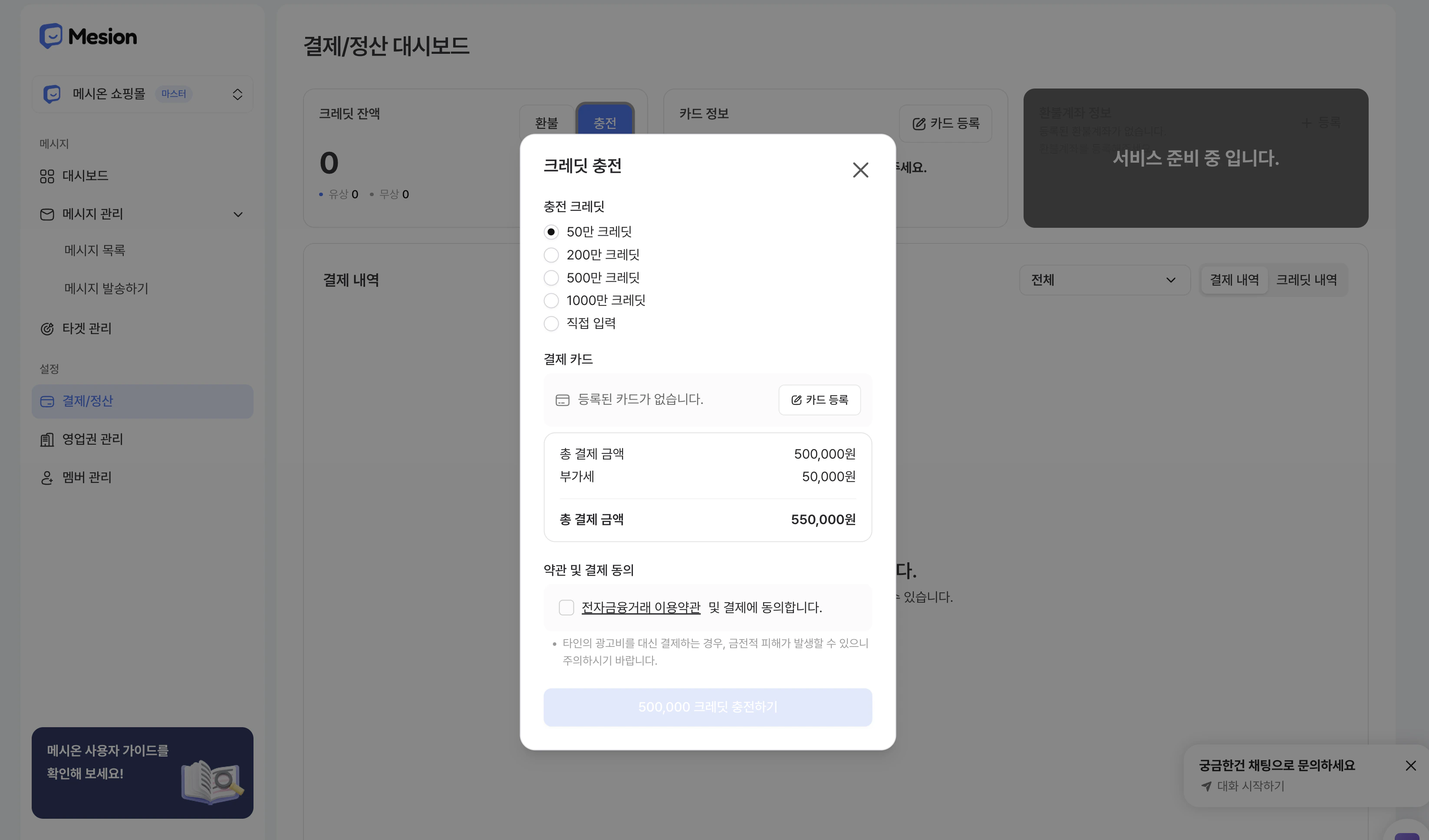
충전 금액은 50만 / 200만 / 500만 / 1,000만 중 선택하거나, 직접 입력할 수 있어요. \
충전 금액에 VAT 10%가 별도 부과돼요.
<Frame>
  <img src="https://mintcdn.com/uneedcomms-b787417f/CuDuGdZpwDsxjNud/images/%E1%84%89%E1%85%B3%E1%84%8F%E1%85%B3%E1%84%85%E1%85%B5%E1%86%AB%E1%84%89%E1%85%A3%E1%86%BA2026-03-20%E1%84%8B%E1%85%A9%E1%84%92%E1%85%AE3.58.05.png?fit=max&auto=format&n=CuDuGdZpwDsxjNud&q=85&s=ae701680f29dced1c3d7897dcff4089d" alt="스크린샷 2026 03 20 오후 3 58 05" width="3292" height="1936" data-path="images/스크린샷2026-03-20오후3.58.05.png" />
</Frame>

<Warning>
  자동 충전은 지원하지 않아요. **크레딧이 소진되기 전에 직접 충전**해 주세요.
</Warning>

***

## 카드 등록

신용카드, 체크카드 모두 사용할 수 있으며 개인카드와 법인카드 모두 등록 가능해요.

* **개인카드**: 생년월일 6자리 입력
* **법인카드**: 사업자등록번호 10자리 입력